
Browser Reality: The Event Loop, Rendering, and Why UX Bugs Look Like Backend Bugs
The browser is a constrained runtime with a scheduling problem: one main thread, many responsibilities, and users who notice missed frames. This post gives you the mental model to debug “random” UX failures as deterministic timing and contention issues.

Axel Domingues
Last month we treated HTTP as what it really is: a distributed systems contract with ambiguity baked in.
This month we go one level closer to the user.
Because a painful truth hides in most production incidents:
Many “backend bugs” are actually browser scheduling bugs wearing a backend costume.
- “The API is slow.” (But the main thread is blocked.)
- “The server returned twice.” (But the UI fired twice due to a re-render + handler duplication.)
- “The page randomly freezes.” (But your app created a long task and missed frames.)
- “Users see stale data.” (But a late response overwrote a newer one.)
- “The spinner never stops.” (But you lost a promise chain during navigation, not an outage.)
If you don’t have a browser mental model, you end up debugging by superstition.
Let’s replace superstition with a clear runtime model.
Give you a practical understanding of:
- the event loop and task queues
- the render pipeline and frame budget
- why “random UI bugs” are often timing bugs
- a production-grade triage checklist that separates backend latency from frontend contention
The browser is not “a fast computer”
The browser is a highly-optimized runtime with one brutal constraint:
Most of your app’s work competes for the same main thread.
That thread must handle:
- JavaScript execution
- user input handlers
- style + layout calculations
- painting
- compositing
- timers
- and framework overhead (React/Vue/etc.)
If you saturate it, the user experiences it as:
- input lag
- dropped frames
- jank
- “slowness” that feels like backend latency
The architect’s reframe
The browser is a scheduler with a user-facing SLA: don’t miss frames.
Mini-glossary (so we don’t talk past each other)
- Main thread: where JS runs and where most UI-critical work happens.
- Task (macro-task): a unit of work taken from the task queue (events, timers, network callbacks).
- Microtask: higher-priority queue (Promises). Runs after the current task, before rendering.
- Frame budget: how much time you have per frame to stay smooth (~16ms at 60Hz).
- Long task: JS work that blocks the main thread long enough to cause input lag/dropped frames (often >50ms).
- Layout thrashing: repeated read/write patterns that force reflow multiple times.
- Hydration: client-side JS attaching interactivity to server-rendered HTML.
- Waterfall: serial dependencies that delay UI readiness.
The two clocks that matter
Web teams often debug only one clock: backend time.
But users experience two clocks:
Network time
How long bytes take to travel and servers take to respond (TTFB, download).
Main-thread time
How long your app blocks input and delays rendering (long tasks, layout, hydration).
Many “slow API” complaints are actually:
- Network is fine
- Server is fine
- Main thread is overwhelmed, so responses can’t be processed and UI can’t update
This is the root of the “backend costume” phenomenon.
The event loop: a scheduling model, not magic
Here’s the version that stays useful under pressure:
- The browser takes a task from the task queue (click, timer, network callback…)
- It runs JS until the stack clears
- It drains microtasks (Promises)
- If needed and possible, it performs rendering steps (style/layout/paint/composite)
- Repeat
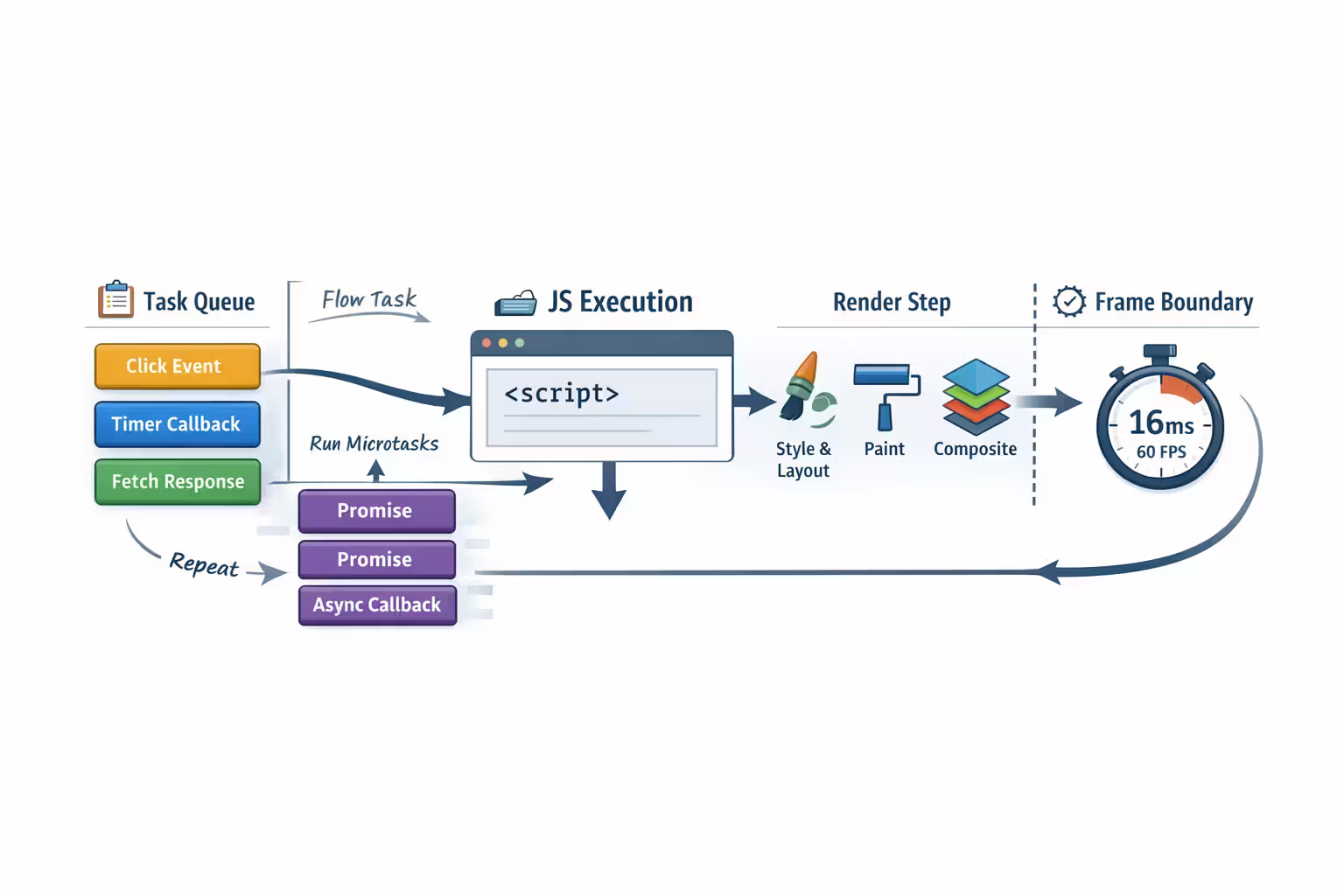
Why microtasks matter (yes, for UX)
Promises run in the microtask queue.
If you create a microtask storm (lots of chained Promise callbacks), you can delay rendering even if each callback is “small”.
So “I’ll just chain a bunch of Promise callbacks” can accidentally block the UI.Microtasks run before the browser can render.
Rendering: the pipeline you pay for (whether you profile it or not)
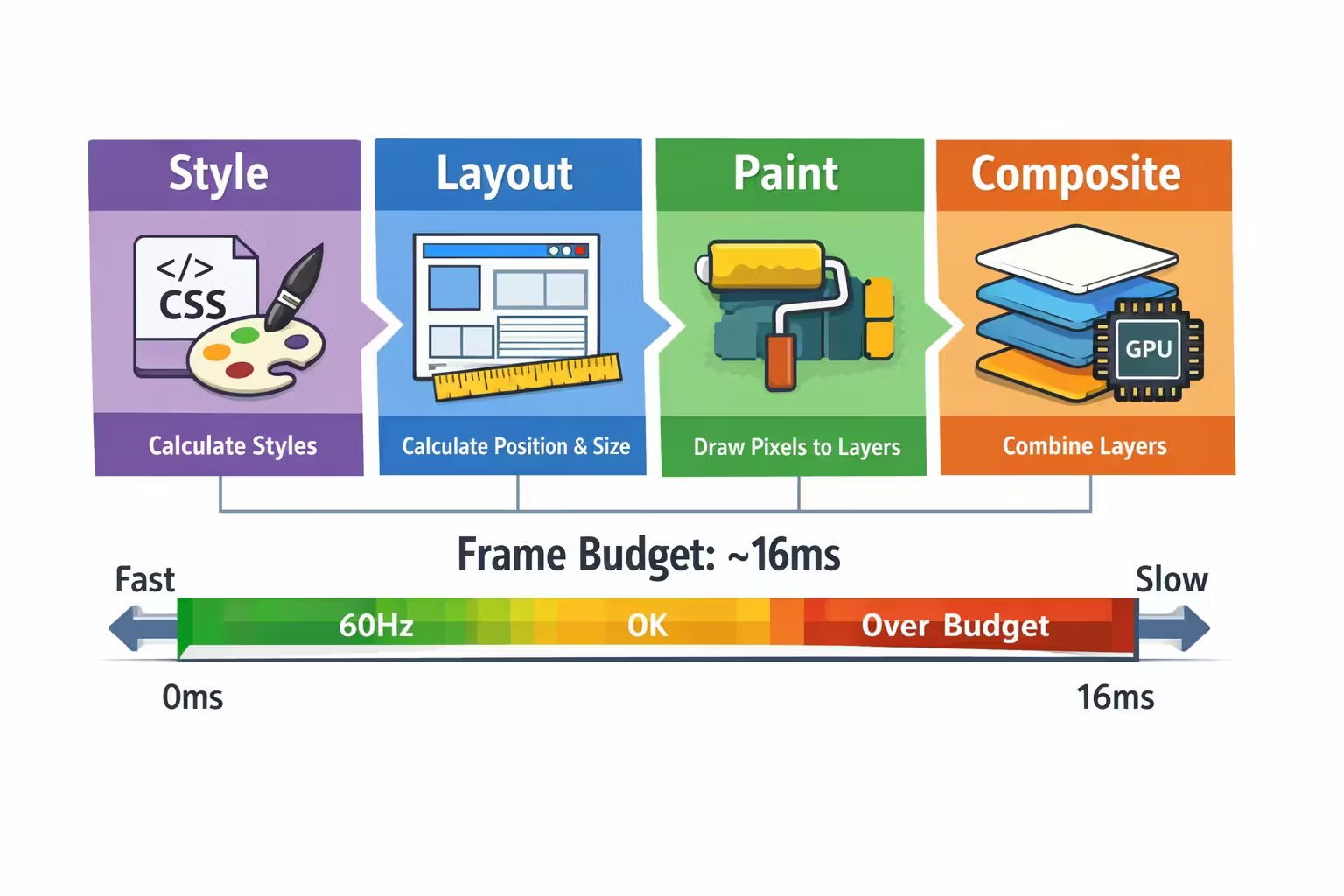
To display pixels, the browser runs something like:
- Style calculation (CSS rules → computed styles)
- Layout (positions/sizes)
- Paint (draw into layers)
- Composite (combine layers, GPU-friendly)
If you force layout repeatedly or paint too much, your UI becomes “slow” even when the server is instant.
The frame budget (the only SLA your user cares about)
At 60Hz, you have roughly 16ms per frame.
That 16ms includes:
- JS work
- layout/paint/composite work
- and everything else competing for the thread
If you consistently exceed it, you get jank.
If you occasionally exceed it, you get “random” jank.
The performance truth
Users don’t experience “average speed.” They experience missed frames and input lag.
The input-to-frame loop (why “click didn’t work” happens)
When a user clicks, your app needs to do at least this:
- handle the input event
- update state
- render/commit DOM changes
- let the browser paint the new UI
If step (1) or (2) is delayed by contention, the user perceives:
- “button didn’t register”
- “I had to click twice”
- “server is slow”
Two practical implications:
- Immediate feedback beats correctness theater. Disable submit, show a local “working” state instantly.
- Keep click paths lightweight. Don’t parse megabytes of JSON or render huge trees synchronously in the same tick as input.
Why UX bugs look like backend bugs
Let’s map common symptoms to the real underlying mechanism.
What’s happening
- The response arrives quickly
- But JS is blocked, so the handler can’t run
- UI updates are delayed
Typical causes
- long tasks (heavy computation, JSON parsing, large renders)
- hydration work on initial load
- layout thrashing (DOM reads/writes in loops)
Fix direction
- reduce main-thread work
- chunk work (yield between chunks)
- offload compute (Web Workers)
- reduce render cost (memoization, virtualization)
What’s happening
- The UI event fires twice (or handler runs twice)
- Or the user clicks twice because there’s no immediate feedback
- Or the app retries without idempotency keys
Typical causes
- missing disabled/loading states on submit buttons
- re-renders recreating handlers and losing in-flight guards
- optimistic UI without rollback discipline
- retries + non-idempotent endpoints
Fix direction
- immediate local UI feedback + disable submit
- in-flight lock at UI boundary
- idempotency keys (backend contract)
What’s happening
- Requests return out of order (normal)
- Late response updates state after a newer request completed
Typical causes
- missing request cancellation / “latest-wins” logic
- shared state store updated by multiple async sources
Fix direction
- cancellation via AbortController
- sequence numbers / request versioning
- explicit “takeLatest” semantics
What’s happening
- A promise chain is broken
- component unmounted mid-request
- error path not handled
- loading state never cleared
Typical causes
- missing
finallycleanup - navigation races
- swallowed errors
Fix direction
- centralize request lifecycle
- always handle error + finally
- log state transitions with request IDs
What’s happening
- scroll triggers expensive work (layout/paint)
- main thread misses frames
- UI feels “frozen”
Typical causes
- heavy DOM (too many nodes)
- expensive style recalculation
- synchronous work on scroll
Fix direction
- virtualization
- avoid forced reflow
- move work off scroll path (requestAnimationFrame, passive listeners)
The pattern is consistent:
The browser is a scheduler. Your app is a workload.
Many “bugs” are simply the scheduler doing exactly what it must do.
React (and friends) don’t remove constraints — they amplify them
Frameworks are great at expressing UI.
They are also great at turning “small costs” into “big aggregate costs.”
The two phases worth knowing (even as an architect)
Render / reconciliation
Compute what should change (pure work). Can be expensive at scale.
Commit
Apply changes to the DOM (side effects + layout consequences). This is where jank appears.
If your UI feels “randomly slow,” what you often have is:
- a render phase that is too heavy
- a commit phase triggering layout thrash
- effects that create extra work (and extra requests)
Because unbounded re-renders become unbounded cost.“We treat re-renders like database queries.”
The four waterfalls that kill perceived performance
Most teams only look at the Network tab.
But users experience serial dependencies across multiple layers:
Network waterfall
Requests that depend on previous requests. API shape and page boot logic create this.
Data dependency waterfall
UI can’t render “real” content until specific data arrives (auth → profile → permissions → page).
JS execution waterfall
Parsing + executing big bundles, then hydration, then app boot logic.
Rendering waterfall
Layout/paint cost triggered by DOM size, styles, and “measure → mutate” loops.
A page can have a “fast backend” and still feel slow if any of these waterfalls are long.
The practical debugging loop (the one I want teams to standardize on)
This is how you stop guessing.
Step 1 — Separate network latency from main-thread delay
Ask two questions:
- When did the response arrive?
- When did the UI update?
If response arrived early but UI updated late, your issue is main-thread contention or render cost.
Step 2 — Find long tasks and frame drops
Use performance profiling to locate:
- long JS tasks
- repeated layouts
- heavy paints
If you see frequent >50ms tasks, you’ve found your “random freeze”.
Step 3 — Identify the trigger path
Most jank has a trigger:
- initial hydration
- search typing
- scroll handler
- large list rendering
- animation + layout changes
Attach the symptom to a trigger event and you can fix it.
Step 4 — Reduce the work on the critical path
Options include:
- chunk work (process data in slices and yield)
- virtualize lists
- memoize expensive renders
- defer non-critical code (lazy load)
- offload compute (Web Worker)
- avoid layout thrash (batch reads then batch writes)
Step 5 — Add guardrails so it doesn’t regress
- performance budgets (bundle size, long task threshold)
- CI checks (Lighthouse, Web Vitals)
- instrumentation (long task observer, render timings)
Not because your team is bad—because product pressure always trades tomorrow’s speed for today’s features.
A “UX bug triage” checklist for tech leads
When someone says “the UI is broken,” run this checklist before escalating to backend teams.
- Repro quality
- Does it reproduce on low/mid devices?
- Does it reproduce on slow networks?
- Does it reproduce with cache disabled?
- Two-clock test
- Does the network response arrive quickly?
- Is UI update delayed after response? (main-thread issue)
- Concurrency / ordering
- Are multiple requests in flight?
- Can responses arrive out of order?
- Is there a “latest wins” rule?
- Event duplication
- Can the user trigger the action twice?
- Is the button disabled during submit?
- Is there an in-flight guard (client-side), plus idempotency (server-side)?
- Error paths
- Is there a
finally/cleanup? - Are errors swallowed?
- Does navigation cancel or orphan requests?
- Is there a
- Layout + rendering
- Large DOM?
- Layout thrashing patterns?
- Heavy list rendering without virtualization?
This checklist is not about blame.
It’s about locating the layer where reality is breaking.
Patterns that consistently prevent “random” frontend failures
These patterns show up again and again in teams that operate web apps reliably.
“Latest wins” for user-driven queries
Search, typeahead, filters: cancel or ignore stale responses.
Idempotent submits (frontend + backend)
Disable UI + include idempotency keys for critical actions.
Work off the critical path
Defer non-essential computations until after first interaction.
Virtualize large lists
DOM size is a silent tax. Virtualization is the relief valve.
Batch DOM reads/writes
Measure first, then mutate. Avoid forcing repeated layouts.
Budgeted rendering
Treat re-renders as costs. Memoize and structure state to minimize churn.
Instrument long tasks
If you can’t see long tasks, you can’t prevent them from returning.
Make loading states a state machine
Loading → success → error → cancelled. No “in-between forever” states.
A quick reality check: “but isn’t the browser multi-threaded now?”
Parts of the browser are multi-threaded:
- networking
- rasterization and compositing on the GPU
- some parsing optimizations
But your UI-critical JS is still effectively constrained by main-thread scheduling.
Web Workers help, but they introduce:
- message passing
- data transfer costs
- complexity (and sometimes new bugs)
That’s why architect-level thinking matters:
- you don’t blindly “add workers”
- you move the right work off the critical path
- and keep the UI loop simple and predictable
Closing: the browser is your first production environment
If you came from backend systems, it’s tempting to treat the browser as “just a client.”
But modern web apps put huge responsibility in the browser:
- routing
- state orchestration
- rendering
- caching decisions
- and resilience behaviors
So you need a runtime mental model.
Not for trivia.
For survival.
March takeaway
Most “random UX bugs” are deterministic scheduling problems: contention, ordering, and missed frames.
Resources
MDN — Concurrency model & Event Loop
A good baseline explanation of tasks, microtasks, and how JS scheduling works.
web.dev — Rendering performance
Practical guidance on layout, paint, and avoiding expensive work on the critical path.
FAQ
Because timing is variable:
- different devices
- different CPU contention
- different network conditions
- different cache states
- different background tabs
The underlying mechanics are deterministic, but the conditions vary—so the symptom looks probabilistic.
Because the user experience depends on:
- bytes arriving
- JS being able to run
- and the browser having time to render
If JS blocks the main thread, the UI can’t update even if responses arrive instantly.
For user-perceived responsiveness, look at:
- long tasks
- input delay
- and frame drops
In other words: “did we miss frames and block input?”
What’s Next
Now that we understand:
- where web architectures place work (Jan)
- how HTTP behaves as a contract (Feb)
- and how the browser actually schedules reality (Mar)
…we’re ready to talk about data boundaries.
Because the fastest way to create complexity is to pick a boundary that doesn’t match your team and product.
AJAX → Fetch → GraphQL → tRPC: Choosing Your Data Boundary
Your data boundary is not “how we call the API.” It’s a coupling contract between teams, runtimes, and failure modes. This post gives you a practical decision framework for REST, GraphQL, and RPC-style boundaries (including tRPC) — with the tradeoffs that show up in production.
HTTP as a Distributed Systems API (Without the Buzzwords)
HTTP isn’t just “how browsers talk to servers.” It’s a mature distributed-systems contract with semantics for caching, retries, concurrency, intermediaries, and evolution. If you design APIs without those semantics, production will teach you them anyway.